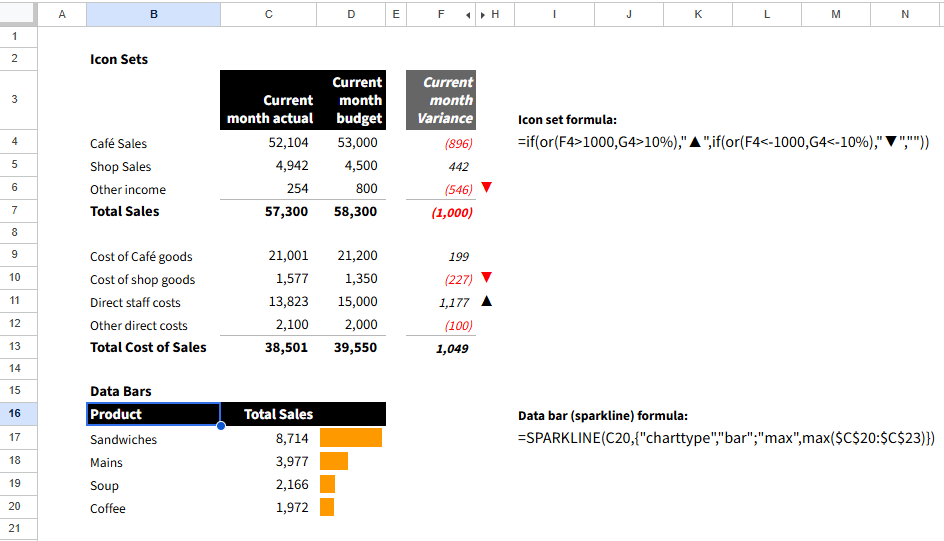
Icon Sets and Data Bars in Google Sheets?

Where are the options for Icon Sets and Data Bars in Google Sheets?

If you’re an experienced Excel user, you’ll know that there are a few great visualisation tools within Conditional Formatting. So you might be disappointed when you first look at the Conditional Formatting options in Google Sheets (in the Format menu). Colour Scale (heatmap) exists as an option, but Icon Sets and Data Bars are nowhere to be seen.

So how can you create something like image above? This post sets out how.

Continue reading “Icon Sets and Data Bars in Google Sheets?”

Five tips for using Googlesheets if you’re used to Excel

Here are five tips for using Googlesheets if you normally use Excel.

1. Check your document is actually a Google Sheet

If you’ve imported it from Excel, it might still be an Excel file that’s being read by Google in compatibility mode. You can tell because name and file type of the workbook will end in XLSX. 

This is the worst of both worlds, as you are getting neither Excel nor Google functionality. Save the file as a Google sheet (in the file menu) 

A screenshot from Googlesheets showing an xlsx file
Continue reading “Five tips for using Googlesheets if you’re used to Excel”