If I had a pound for every time I’ve heard this expression… well, I’d have a few quid.
I’ve got a lot of experience in systems change projects, and this issue is something that comes up a lot.
As I explored in one of my very first blog posts, it’s always worth challenging yourself if you think you need a new system. Your problems might not be caused by the system; and the answer may not lie in a new one.
Copilot welcome screen – the red square show the “enterprise protection” green shield.
I first wrote this post about using Copilot with Excel less than a year ago and I thought it was worth updating.
It’s quite a challenge for trainers to train on Copilot because it changes every day and a lot depends on what sort of licence you have. And even that isn’t consistent, so if I write a post or training materials based on the assumption you can do a particular task with a particular licence, that may not be true the following week.
I always change these three Excel default settings when I’m setting up a new machine or profile.
(1) Allow Leading Zeros
Excel defaults to removing leading zeros. That is, if you type 078456 it becomes 78456.
If you want to keep any leading zeros, you have to type ‘078456. This tells Excel to treat your input as text.
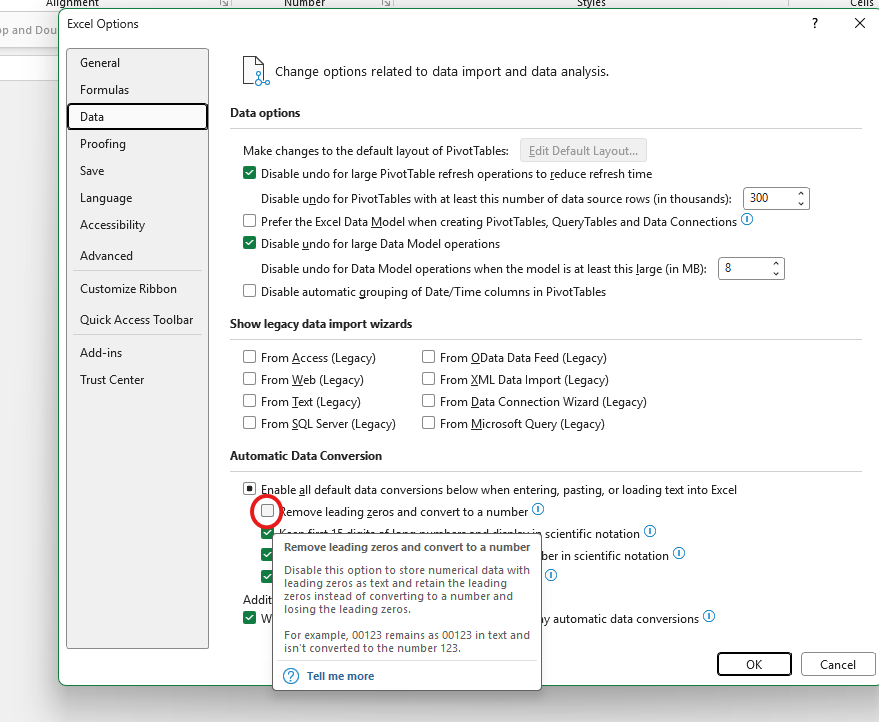
You can (and probably should) change this setting. You can find this in File => Options => Data. Under “Automatic Data conversion”, deselect the first box (“Remove Leading Zeros and convert to a number”). See image below:
This isn’t just a techy change. There are lots of occasions where finance people might want to show zeros as part of a number.
For example, think about bank account and sort codes.
If you’re importing a payment file to or from a CSV file, you need the full string of digits.
Many accounting systems also have account codes that start with zeros. For this reason I often have account codes set to text when I’m building accounts models.
(2) Pivot Table Formatting
There are lots of settings for changing how your pivot tables look. If you have a particular look you prefer, you can change your defaults.
In the same File=>Options=>Data window pictured above, you have the option to “Make changes to the default layout of pivot tables”.
My particular changes are to switch to Tabular layout, and in the further options bit I untick “Autofit column widths on update”. But there are loads of other options you can change as well.
(3) Move the Quick Access Toolbar to below the Ribbon
The Quick Access Toolbar is a feature of most Microsoft products. In Excel, the default items are not massively helpful to me – I use keyboard shortcuts for Save, Undo and Redo.
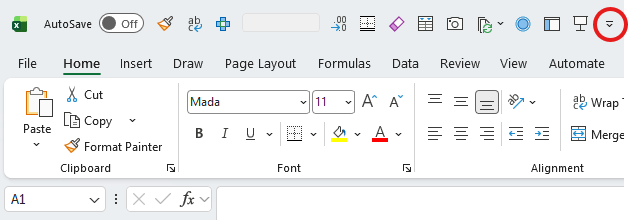
The location of the QAT is also not helpful to me, as you have to be able to recognise icons to use it effectively. So instead, I move it to under the Ribbon. Here is the before picture – I’ve highlighted with a red circle the button you need.
Quick Access toolbar in default location – use the arrow highlighted to move it.
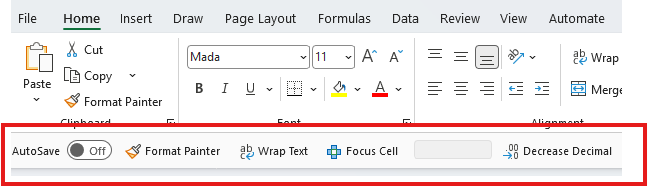
And here is the after picture:
Much easier to read!
Other ways to customise your Excel experience
There are tonnes of other ways you can customise your experience. For example, I wrote a blog post here about using Cell Styles. You can set up Templates and default Table styles too. However, these are all specific to workbooks, whereas the three Excel default settings I’ve highlighted above apply to your machine or profile.
Ryan Gosling as Dr Ryland Grace in Project Hail Mary (2026)
I promise there is some Excel in this post – skip to the end if that’s what you’re here for.
This post is about both the book and film versions of Project Hail Mary. I’m making this post spoiler free, but the links I include may contain spoilers so follow at your own risk. When I first read the book a few years back I was lucky to have no prior knowledge about it or any of the plot points, and I think it made it that much more thrilling. So if you have the chance to enjoy either the book or film without knowing anything first, then I don’t want to take that away from you!
Sometimes this would include some Power Query content, and over time I had developed quite a bit of material for Power Query training. My Power Query training is always really popular with people who use Excel a lot. They just don’t often know it exists.
It occurred to me that my training model might not suit some people who would really benefit from PQ training. For example, if they are the sole finance person in their organisation. Or if they work as a consultant.
And so this time last year, I decided to trial a few sessions where I asked people to register an interest. I then organised these people into groups of 3-4, so that I could deliver a classroom-like training session.
I wasn’t sure what to expect, but there was quite a lot of initial take up. And I was delighted that people who did go on the course often recommended it to others. My feedback forms for the courses have been incredibly positive.
We spent an intense four hours learning all about PQ – with Jess providing sample data for us to use so that we could not just watch/listen – but really get ‘hands on’ with the tool – and learning much faster as a result.
Those who I’ve trained appreciate the hands-on nature of the course. And that the examples come from my practical experience. Delegates can follow along and there’s plenty of time to ask questions or go over things. We often have good conversations too, where delegates share ideas for future uses.
The course was brilliant – incredibly useful and perfectly paced. There were many penny drop moments where we realised something was going to save us so much time….. Highly recommend to FDs/FCs, finance teams and anyone that plays around in excel.
I love introducing people to Power Query. It’s fantastic to see them realise how much time they can save by using it, and how easy it is to get fast results. I would love to do more of this in 2026.
People sometimes ask: “Can you give us an example of Power Query uses”?
(In fact, they often ask, “Can you give us an example of Power Query use cases” but I hate that phrase with a passion and refuse to use case it.)
So here are some very recent examples of Power query uses from a part-time FD role that I’m doing at the moment. It’s for a small but not tiny charity with lots of systems that don’t talk to each other.