Screenshot of Excel template for calculating Employer’s National Insurance before and after the changes
I posted on LinkedIn a couple of weeks ago about creating an Excel template to calculate budget impact of the changes to Employer’s National Insurance.
In this post I’ll share a few observations, both about the calculations and also the act of creating the template.
I’m a late adopter of Cell Styles in Excel. Before I started doing financial modelling and consulting work for other people, I didn’t really appreciate how useful they were.
I wish I’d learned them a lot earlier as they would have been helpful in earlier roles, too.
I attended the Global Excel Summit 2024 online earlier this month, and in no particular order, here are ten things I learned.
1. Power Query at Chanel
The most inspiring session was given by two people who work for Chanel, who explained how they had used Power Query to reduce thousands of hours of processing time.
In the middle of a day that was focussed on the theoretical uses of AI, it was fantastic to hear about a tried and tested but scandalously underused technology being used to deliver real business change.
More generally their approach to business process improvement sounded fascinating and I’d love to see this become more widely known.
I recently designed and delivered some Excel training for auditors. Specifically, it was Excel training for audit trainees who had just started at the firm.
I benefitted enormously at the start of my career when my employer arranged for all new audit trainees to have Excel training as part of our induction. Even though it was pretty basic, it established a good grounding in things like formula construction, absolute and relative cell references, and a few shortcuts.
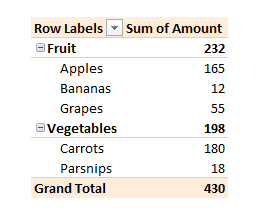
If your pivot table defaults to Count instead of Sum, then you have inconsistent numerical data.
I found this out on a webinar about five years ago, and it still seems to be a mostly unknown feature.
And yes, I call it a feature, not a bug, because it is ultimately helping you.
Pivot table showing a Sum of Amounts column. If this defaults to Count, watch out!
What it is doing is giving you an immediate message that your numerical data has gaps, or perhaps has numbers formatted as text, or other errors. If you ignore this, you might produce inaccurate analysis.
So – if your pivot table defaults to Count, don’t do what I used to do, which was to tut and manually change it to Sum.
How to change the layout of your pivot table – one of many things I learned at the Global Excel Summit
Last week I “went” to the Global Excel Summit. This is a three day event featuring many of the superstars of Excel, eg Leila Gharani, Chandoo, Wyn Hopkins, Oz du Soleil etc etc. It was virtual this year, but as I’d never been before I didn’t know what to expect anyway.
I learned way more than five things, of course, but here are my biggest takeaways.